| Ray Mueller Consulting |
| MyExpense Tracker |
"I spent 30 minutes organizing my database and about
15 minutes building the actual application."
- Ray Mueller of Ray Mueller Consulting
|
|
|
MyExpense Tracker |
Ray Mueller Consulting
Sanborn, NY USA
|
The MyExpense Tracker application was designed to help me track and segregate my
business expenses and, secondly, to help me learn how to develop an application in Iron
Speed Designer, giving me an opportunity to learn how to integrate code customization
into the application.
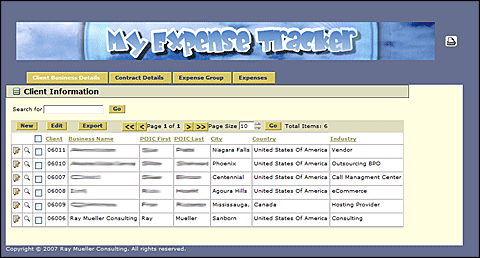
Client Information Display
The application creates a tracking ID which tells me which client the expense was
incurred against and the contract. The user enters a new client into the My File Tracker
application and the system creates a unique serial number and assigns it to that client.
Once this process is complete and the client is active in the system, the user creates a
contract for this account. It is possible for one company to have multiple contracts (e.g.
projects) with the company at any given time, so each contract is numbered for added convenience.
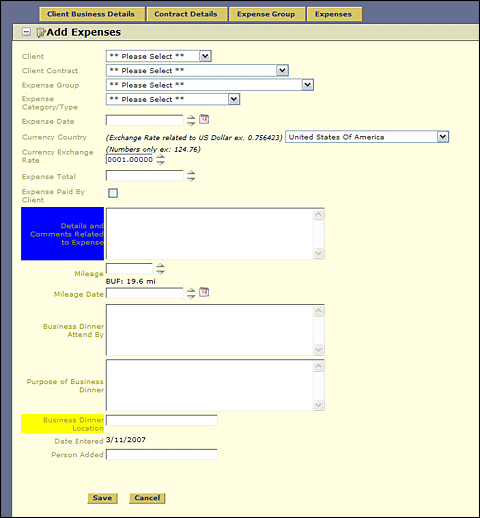
Expense Entry page
The application uses a similar protocol to track internal business expenses for employees.
An employee registers and is assigned a serial number. From here, they create an expense group
for each business event, such as business trips, for example. I created an Expense Group which
is used to bundle the expenses into a common category such as when taking a business trip.
This can be taken one step further as the employee can then login to each individual expense
in a particular group to update transaction information. This makes it very easy to keep track
of business spending over the course of the year.
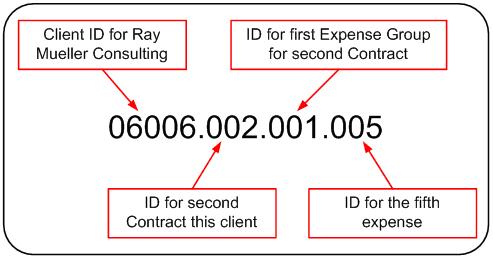
The following diagram highlights the hierarchy ID structure.
|
Application size and scope |
|
The application uses a single Microsoft SQL Server database and has 11 tables.
The largest table contains approximately 400 records which have accumulated in
the first three months since inception. This table will continue to grow as time
goes on and additional clients and expenses are added. The application contains
20 functional web pages. I use the application to process between 15 and 20
transactions per month.
|
The project |
|
I built the application by myself in three days. The Iron Speed Designer portion
of the product took considerably less time. I spent about 30 minutes organizing
my database and about 15 minutes creating the actual application. I spent the next
two days researching Iron Speed Designer and customizing the code.
|
Code extensions and customizations |
Code customizations have been incorporated to handle the assignment of tracking
numbers. Each client entry required the creation of its own dedicated identification
numbers for tracking individual contracts, expense groups and individual expenses.
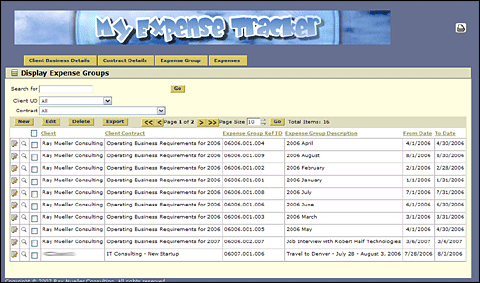
Expense Group Display
Nearly all of the code customization takes place on the GETUIData() routines in
the RecordControl classes where the application retrieves a counter from a table,
increments the counter, formats the data, saves the incremented count back to the
table and saves the formatted client ID with the client record.
The following flowchart typifies the process. The process for creating the unique
identification numbers follow the similar process.
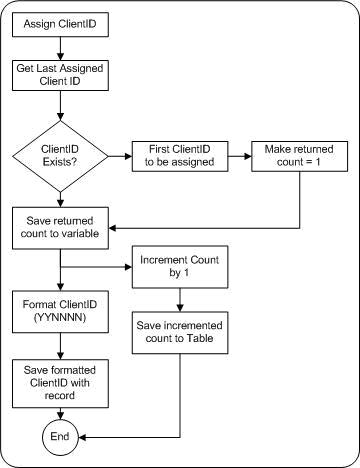
Client ID Assignment flowchart
There are approximately 60 lines of custom code in this application which I implemented
in two days!
|
Layout customizations |
|
I used the standard McKinley design theme in Iron Speed Designer.
|
Iron Speed Designer impact |
Iron Speed Designer's ability to build application web pages saved me a week
of development time alone! Normally, by hand, it would take me at least two or
three weeks to get this far. I estimate that it saved me no less than 16 person-hours
of hand-coding.
Iron Speed Designer would have saved me thousands of dollars if I had been building this
application for a client. This being said, in-house, it saved me the cost of
purchasing QuickBooks software, as this was my alternative. There is no way
I would have attempted this project on my own. I just don't have enough time
to build an application like for myself by hand.
|
Next steps |
|
The application as it is built today is functional and works extremely well as far as
input of information. Over the coming months, the application will go through a number
of enhancements to include client payments, documenting billable hours and making the
entry process easier. I may also deploy the application to several client sites in the
future.
|
About the developer |
Ray has been involved in technology for thirty years and has recently taken up application
development as the means to bring conceptual ideas to businesses. His experience spans
a number of industry verticals specializing in BPO, call center technology, new start-up
companies, eCommerce, IVR, VoIP, customer care and retention applications and general
Internet applications.

|
|
|
|
|
|
|