| Ohio State University Medical Center |
| Pulmonary Translational Core Portal |
"Using Iron Speed saved us about six to eight months of development time and
approximately $128,000 in development costs. This project would have taken
approximately 12 to 18 months without Iron Speed Designer."
- Jason Buskirk, Manager of Ohio State University Medical Center
|
|
|
Pulmonary Translational Core Portal |
The Ohio State University Medical Center
Columbus, Ohio USA
|
The Pulmonary Translational Core Portal was developed for The Ohio State University Medical Center,
The Division of Internal Medicine, Division of Pulmonary, Critical Care and Sleep Medicine. Consisting
of 33 faculty and 14 fellows, this division of the hospital provides the highest level of state-of-the-art
teaching in pulmonary medicine and pulmonary science to clinical, scientific and University communities,
as well as maintaining active research in both clinical and basic science research.
This application serves as a central data depository for all data collected during each pulmonary
outpatient and inpatient study visit. Faculty, fellows, and clinical trials staff members in the
Division of Internal Medicine, Division of Pulmonary, Critical Care and Sleep Medicine use this application
on a daily basis. This application ties into the existing Medical Center Information Warehouse to pre-populate
data elements thereby increasing accuracy and efficiency of data.
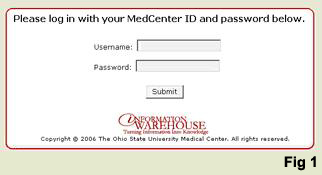
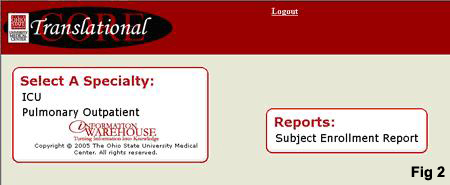
Users access the portal in a wireless environment on a PC Tablet. A user logs into the application
(Fig 1) and depending on his/her level of authentication, is given a list of specialty areas (inpatient
or outpatient) or reports from which they can select (Fig 2). Within these specialty areas are different
study-specific data entry applications that are also available based on the user's access level.
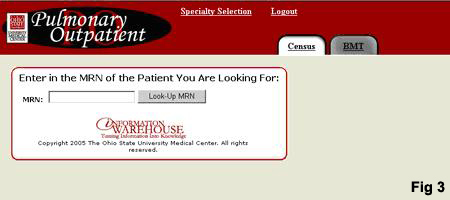
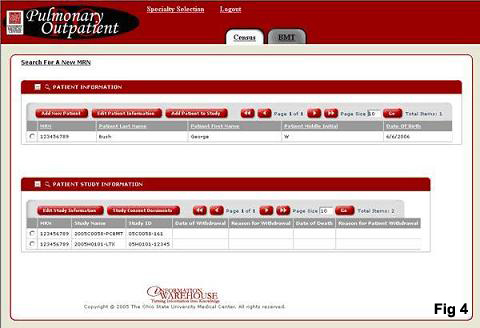
If a user selects an Outpatient specialty area, he is taken to the Outpatient Registration System
(Fig 3). Here the user has the option to search for a patient using his MRN (Medical Record Number)
or to select a tab for a particular outpatient study. The Outpatient Registration Systems allows the user
to enter new patients into our system or edit already existing patient data (Fig 4). This patient Registration
system is used to track all patients involved in Outpatient research studies. If a user selects a tab,
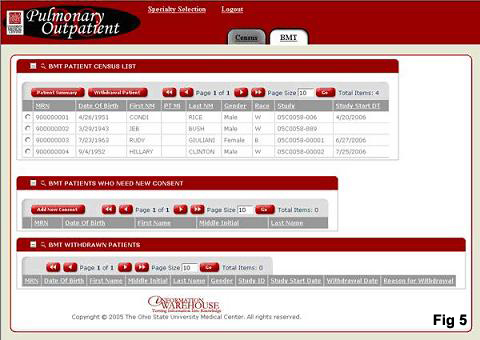
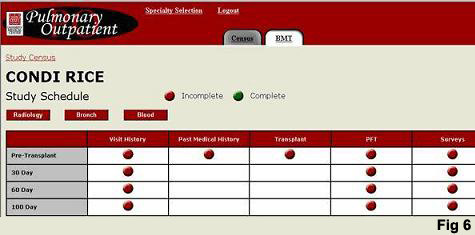
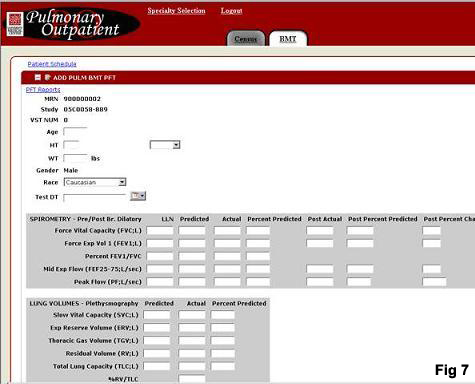
he is taken to a study patient census page (Fig 5). From this page, the user can select a patient for
entering study-specific data (Fig 6 and Fig 7).
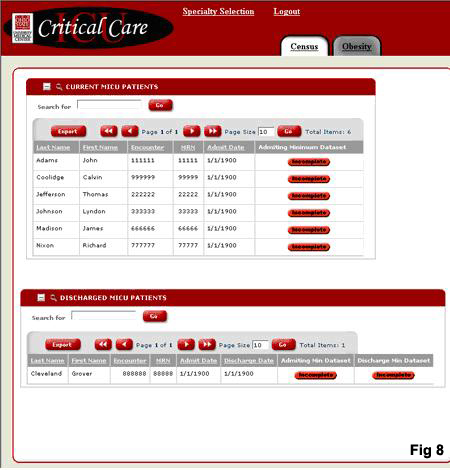
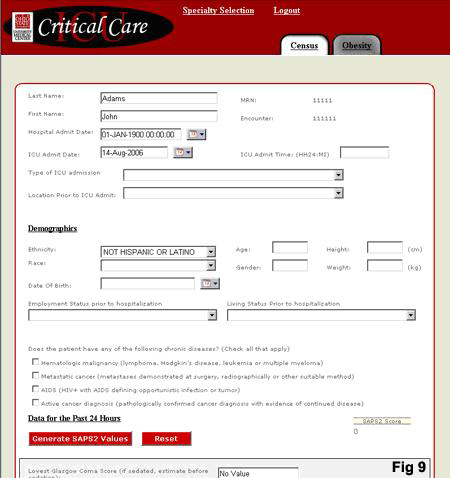
If a user selects an Inpatient specialty area, he is taken to the inpatient patient census
(Fig 8). From the inpatient census page, the user can select a patient and enter general and demographic
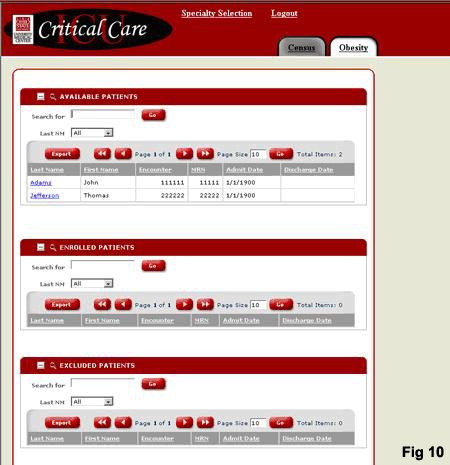
data or select a tab for a particular inpatient study (Fig 9). If a user selects a tab for a particular
study, he is taken to a study patient census page (Fig 10). From this page the user can select the
patient and enter study-specific data.
The Pulmonary Translational Core Portal is a new application based on an existing paper system.
Previously, if a clinical trial had 200 elements they would be manually entered in a Microsoft Word
document. At the end of the trial someone would convert these to a Microsoft Excel spreadsheet and
then hand import these elements to a database within the Enterprise Information Warehouse at the hospital.
Today, this application has eliminated the use of Excel spreadsheets altogether. Now all of the information
is entered directly into the database. This makes patient information much more accessible and allows the
staff to analyze the results of each study through implementation of third-party statistical tools such as
SAS.
|
Application size and scope |
|
The application accesses three Oracle and Access databases comprising 116 tables and 134
web pages. The largest table is the ADT_VISIT table which contains 4,199,847 records to date
and continues to grow. This table collects data for every patient who visits the hospital and
maintains patient history. Currently there are 25 people using the application, processing
between 20,000 and 25,000 transactions each month.
|
The project |
|
There were five developers and one project manager working on this application. It took six
months to develop, five of which were spent on the Iron Speed Designer portion.
|
Code extensions and customizations |
The hospital has very complex business logic, and therefore we spent a great deal of
time customizing this application accordingly. For example, the Obesity Study requires
a follow-up call 30 days after completing the study. Based on the patient's answers to a
specific list of questions asked during this call, he may or may not require additional
follow-up. We customized the application to navigate the user through various screens based
on the patients' answers.
There are over 7,000 lines of custom code in the application including these code customizations:
 | Security — integrated with an enterprise identity management solution (LDAP - Lightweight Directory Access Protocol). We used our own custom security model for page- level security access.
|
| Client Side Scripting — We added client side scripting (JavaScript) to handle complex business logic. Also added was a specialized class to make sure changes made by the business logic (client side scripting) were seen by Iron Speed when data is submitted to the database on the server side. This class also contains code that inserted a blank option for all dropdown lists in the Iron Speed Designer Edit Record pages. This allowed those dropdown lists to be unselected.
|
| Code Telescope — Several pages utilized the Code Telescope in Iron Speed Designer to re-bind data to tables when a page post- commit transaction occurs. This was done to display data that was saved to the database. We also used the Code Telescope to add specific URL data onto links for each record control when it was created.
|
| Error Handling — Modified the application base classes to allow custom error messages to be displayed.
|
| Redirect — Modified the safe classes to append custom URL variables at the end of a URL string.
|
| Record manipulations — We modified Show Table records to dynamically display images links with custom URLs.
|
| Database Security — We added code to the base classes to access the database to set Oracle user roles. The Oracle user roles are used to establish the logged in users access to database objects.
|
| Calculations — A few pages contain code that pull manually entered data, perform calculations and place the answers into the form.
|
| Web Services — We added pre-existing web services to the portal for authentication (for login), database access (for specialized queries to pull data from the database) and application usage (to track who and how many users are using our application).
|
| PDF Display page — We created pages to upload and/or download PDF files to and from our database.
|
| Page Load Events — Several pages contain methods that will modify text and set variables on the Page Load event.
|
We spent a great deal of time customizing the portal infrastructure as well. Now that we
implemented this business logic for The Pulmonary Portal application, it will be very easy
to apply it to other studies in different departments.
While we did not directly incorporate third-party tools into this project, its users have
discovered that Iron Speed Designer makes it incredibly easy to integrate advanced third-party
statistical reporting tools into the application. Users need this software at the end of a study
in order to evaluate and report the data collected throughout their study.
|
Page layout customizations |
|
We customized the standard application style sheets, as well as editing the graphics to fit our company
standards. We did not need to create and application-specific design theme; instead we edited the pre-defined
Fuji page style to better fit our company's standards.
|
Iron Speed Designer impact |
|
Using Iron Speed Designer saved us about six to eight months of development time and approximately
$128,000 in development costs. This project would have taken approximately 12 to 18 months
without Iron Speed Designer. The application was possible without Iron Speed Designer; however
it would have been much more costly.
|
Next steps |
There are currently other applications being developed, as well as a list of projects that
have been backlogged that will be a part of the Pulmonary Portal application. A major advantage
of the portal is the ease of incorporating additional Iron Speed Designer applications.
We have proposed this portal to several other research groups in the hospital including the Cardiovascular
Imaging Group.
We will be adding more users and deploying additional sites going forward. This application and
user group will grow with every new research grant that is taken on by a member of the Pulmonary
Translational Core Group.

|
About the developers |
Jason Buskirk has seven years of development experience in various languages and database
systems. He has a B.S in Computer Information Systems from DeVry University and has spent
the past two years working as a project manager for the Ohio State University Medical Center.
Jessica Backer holds a B.S. in Information Technology from the Rochester Institute of
Technology. Jessica has extensive experience with developing and implementing Coldfusion
systems. Most recently she worked with The Strong Hospital at the University of Rochester to
design and develop their Coldfusion system.
Ryan Deiter has a B.S. in Computer Science from Northern Michigan University. He previously
worked as an independent contractor for Cray Inc. where he was responsible for implementing
and designing diagnosis software for Beowulf clusters. This required writing UNIX kernel modules
that monitored sensors on each blade in the cluster.
Chris Waugh has a B.S. in Computer Information Systems from DeVry University. He previously
worked for Columbus Ohio Transit Authority (COTA) where he analyzed their scheduling system to
maximize efficiency, and for Buckeye Elite Showcase Tournament where he developed a web application
to register teams and players.
Bryan Ball graduated from the University of Notre Dame with a B.S. in Computer Science. Most
recently he upgraded Tempur-Pedic Inc.'s entire EDI infrastructure to work with Oracle 11i Applications
using VB.NET, XML, and PL/SQL. He has experience with the functional design, implementation, testing, and
troubleshooting of health care information software products in a client-server environment using
Visual C++.
Felix Liu has over ten years of Development experience in various languages, five of which were spent
as a Database Administrator (Informix, Oracle). He has a Ph.D. in Chemistry from Tulane University.
Felix has served as a System Administrator on almost every flavor of UNIX systems.

|
|
|
|
|
|
|