| Inscript Acceptance Test Solutions |
| Rapid Test Development |
"We saved approximately three person-months and $30,000 using Iron Speed Designer!"
- James Whistler, Managing Director of Acid Yellow
|
|
|
Rapid Test Development |
Inscript Acceptance Test Solutions
Buckinghamshire, UK
|
The Rapid Test Development (RTD) toolset was developed by Inscript Acceptance
Test Solutions as a Windows Forms-based product. The toolset enables users to
build packs of test scripts for acceptance testing purposes. Inscript has a
successful following for the RTD toolset in the UK. They approached Acid Yellow
for help migrating their software onto a web-based platform.
The RTD toolset enables users to produce and maintain packs of quality acceptance
test scripts quickly, accurately and without the need for expert knowledge of the
system under test. The scripts produced are sufficiently detailed to enable test
execution to be carried out by analysts with no background knowledge of the system
under test. This enables Inscript's customers to dramatically reduce costs in the
acceptance test phase of a project.
The RTD toolset is comprised of three sub-systems:
 |
Modeller — Allows a user to create a logical model of the system under test. This model is comprised of logical screens, its
entities (buttons, input fields,etc.) and the navigation routes between them. Building the model requires no understanding of the
function or business rules behind the screens.
|
|
Scriptor — Once the logical model is built, Scriptor records the functional flow of the business processes requiring testing.
A business process is recorded through the user interaction with the system under test. The test and system data used and displayed
throughout the business processes need not be recorded when using Scriptor.
|
|
Testware Manager — Enables users to combine the recorded business processes with imported test data, allowing test scripts to
be produced. There are numerous configuration options available to customize the test output. These are written to Word, Excel or CSV
for manual execution or import into Test Management products such as Quality Center. Testware Manager also allows users to import new
test data and reapply it to the existing script pack.
|
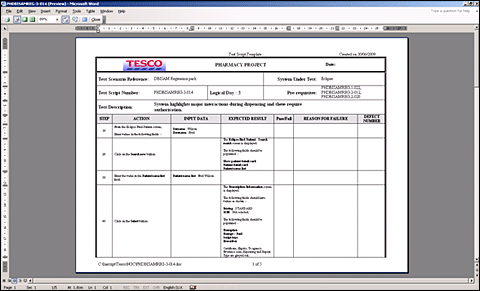
A screenshot of test script in Word format.
|
Application size and scope |
The RTD toolset accesses one Microsoft SQL server database comprised of 51 database
tables and 102 web pages. The largest table is the BusinessProcessStepEntry
table which records the configuration of every entity, on every screen in every
business process. The number of records varies depending on the size of the
system under test.
The number of application users depends very much on the size of the system under
test as well as the size of the Inscript consultant team. There are rarely more
than four users on the system at any time, but this will change as the application
is continually developed through the next stages. The application currently processes
40,000 transactions each month.
|
The project |
It took two developers, one from Inscript and one from Acid Yellow, approximately three
months to implement the project. As the developer from Acid Yellow, I did all the Iron
Speed Designer work. The complex functionality of the RTD toolset was simply migrated
from the Windows Forms environment to Iron Speed Designer.
It took a month's work to ensure the existing data model for the RTD toolset application
was well-suited to a web-based platform. The Iron Speed Designer work took about two
weeks. The remaining six weeks were needed to incorporate the functionality from the
RTD toolset.
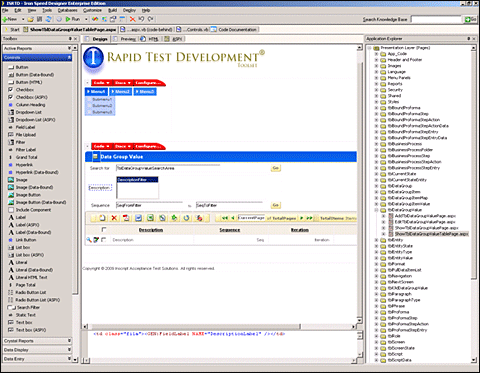
Iron Speed Designer automatically removed the "tbl" prefix to the existing data model. A neat touch!
|
Code extensions and customizations |
What excited us here at Acid Yellow about this project was that we worked on code customizations
for about a month, and yet wrote remarkably few lines of code. Iron Speed Designer has more
potential to accelerate our development than we had previously realized. The vast majority
of the custom code was migrated from the old version of the RTD toolset.
We changed the base classes within Iron Speed Designer to ensure that a single SQL Server
database can be used for multiple Inscript customers and systems under test, without risk
of mixing up client or system data.
We did not need to incorporate any third-party tools because of Iron Speed Designer's wide
range of features. The power of making changes to the base classes was a new direction for
us, and we are now very excited at the potential now available to us.
|
Page layout customizations |
We used the standard Mount Redmond page style in Iron Speed Designer to create our application.
There are plans to customize the design theme for each individual requirement when the
application is made available to Inscript's customers.
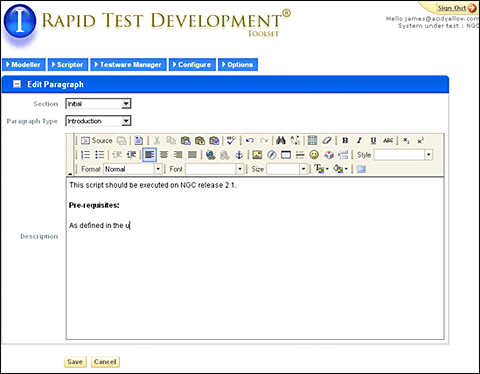
Rich text editing was widely implemented in the application.
|
Iron Speed Designer impact |
|
We saved approximately three person-months and $30,000 using Iron Speed Designer! I estimate
the project would have required at least six months without the tool. While feasible, the
investment required to complete this project by hand would have prevented Inscript from taking
the plunge in this economy.
|
Next steps |
Inscript consultants currently use the application onsite with their customers. The next
stage of the project is to enable Inscript's customers to access and download the test
packs produced from the web site. The final stage, and ultimate goal, is to enable customers
to use the site and produce their own test packs directly via a pay-per-use approach.
Inscript can add their own users already, but at present, these are exclusively their own
consultants. Allowing Inscript's customers to use the system will dramatically expand
their user and site numbers.

|
About the developer |
James Whistler has worked in IT since 1992 in a variety of roles and across a wide range of
industry sectors. These include finance, retail, logistics and insurance. His technical
experience includes mainframe applications as well as PC and web-based development.
James graduated with a double major in Physics and Computer Science from the University of
Southampton, UK.

|
|
|
|
|
|
|