| InDepth Screening |
| InDepth Screening Application |
"We estimate we saved six months of development time and at least $80,000 by using Iron Speed Designer."
- James Whistler, Managing Director of Acid Yellow
|
|
|
Rapid Test Development |
InDepth Screening application
Cirencester, UK
|
The InDepth Screening application was developed for startup businesses aiming to provide
web-based resumes, or curriculum vitae (CV) checking services to customers considering employing
a candidate. The staff at InDepth Screening have been providing this service manually to their
customers for years. Their decision to try and develop a web-based system was taken after consultation
with Acid Yellow. Based on the scope, complexity and budget required to complete the project successfully
we felt that this was the best solution.
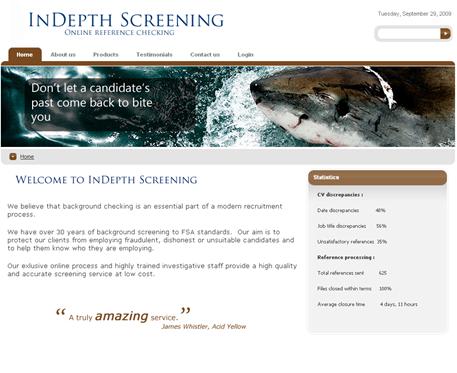
InDepth's consumer website.
InDepth Screening is used by a variety of different users, each with their own distinct subsystem.
- Clients: Clients of InDepth Screening are employers who are considering hiring a candidate.
There are two different types of client users, Managers and Employees, each of whom has different
accesses to the system.
- Candidates: Candidate users are job seekers who have provided their CV or resume to a client.
- Referees: Referee users are previous employers or previous providers of education to the candidate.
- Back office users: Back office users are the staff of InDepth Screening and administer the site. There are
three different types of back office users: Managers, Team Leaders and Employees, each of whom perform different functions
and have different accesses to the system.
InDepth Screening provides the vehicle by which the client can validate the candidate's references. It uses email to
communicate between the different users and provide each with an online subsystem to collect their input. By automating
the process as far as is possible, the system minimizes the effort required from InDepth Screening staff and so maximizes
profit.
The process begins with a Client user registering to have a candidate's references checked. The client uploads a copy
of the candidate's CV or resume, provides the candidate's name and email address and selects how many years of references to check.
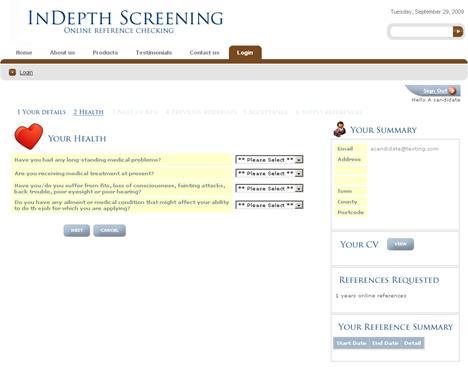
A candidate subsystem page in the InDepth Screening application.
The system then emails the candidate a userID and requires a log in and contact information for the references requested by the client.
Each referee is then emailed by the system, provided with a userID and asked to log in and validate their specific reference.
The client can log in at any time and check the progress being made on the request.
InDepth Screening staff need only get involved when a job is complete to verify that the references provided are valid.
|
Application size and scope |
|
This application utilizes one Microsoft SQL Server, 46 database tables, 30 database views and 86 web pages.
The largest database table in the application is called CandidateRequestReferenceAttempt. It maintains details
of every attempt to contact referees within the application.
|
The project |
The implementation team consisted of three individuals: one business analyst from InDepth Screening, one graphic
designer from Acid Yellow and me. I did all of the work in Iron Speed Designer myself.
We completed the project in six months and spent most of our time working on the business process design. The Iron
Speed Designer portion of the project only took two months.
|
Code extensions and customizations |
I wrote approximately 10,000 lines of custom code over the course of a month. The main customization gets the system to
interrogate an SMTP server to receive inbound emails to InDepth Screening staff. We used ASPNetPOP3 to load incoming emails
directly into the database as part of this process.
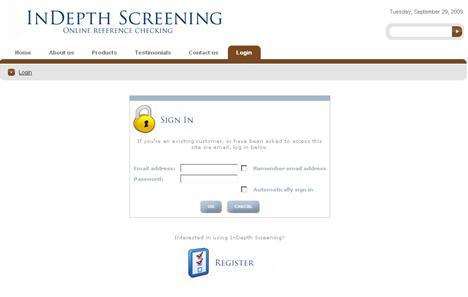
The Iron Speed Designer login screen, run through an iFrame on the DotNetNuke website.
The entire application is run through a DotNetNuke portal which provides the front-end of the website, including marketing
information, etc. We used a third-party iFrame component to incorporate the Iron Speed Designer application.
|
Page layout customizations |
|
We changed the standard Sierra page style in Iron Speed Designer to include extensive CSS modifications. This application
supports a large number of images, which improve and simplify the application's overall appearance.
|
Iron Speed Designer impact |
|
We estimate we saved six months of development time and at least $80,000 by using Iron Speed Designer. The application
could have taken more than a year to complete if we had had to code by hand. We bid for the project against a number of off-shore
development companies and would never have been able to compete with them without Iron Speed Designer.
|
Next steps |
|
We're already discussing the next project with the client. They have extensive requirements to add new products to the range
already provided, including anti-terrorism checks, landlord/tenant checks and company directorship checks.
|
About the developer |
James Whistler has worked in IT since 1992 in a variety of roles and across a wide range of
industry sectors. These include finance, retail, logistics and insurance. His technical
experience includes mainframe applications as well as PC and web-based development.
James graduated with a double major in Physics and Computer Science from the University of
Southampton, UK.

|
|
|
|
|
|
|