| Emphasys Software |
| Emphasys Call Center |
"Our small group of developers historically produces three applications
every three months. In the last three month period using Iron Speed Designer,
we created 16 different applications!"
- Chris Lema, Vice President of Software Engineering of Emphasys Software
|
|
|
Emphasys Call Center |
Emphasys Software
Petoskey, MI USA
|
The Emphasys Call Center is a brand new application that was built for Emphasys Software
as part of a portal suite called the Call Center Module. It is used by clients who purchase
this product, such as housing authorities for various cities. The Call Center Module is primarily
used by the customer service staff at housing authorities and allows them to manage members on subsidized
housing waiting lists.
In this case, we were dealing exclusively with the Cincinnati Metropolitan Housing Authority.
The Emphasys Call Center application captures all calls that come into the housing authority.
The operators can either create a new contact, or look up a contact that is already in their system
and log the call. Each call has a variety of data elements that go with it, characteristics not only
of the call itself, but of the caller and the program in which they are enrolled. Call center users
quickly fill in this detail and can then attach actions to each call. These actions are the follow-up
steps that someone will have to take to resolve the call. The system also allows for quick reporting to
see how many calls of each type exist, dealing with which population, and ultimately how many calls are
still considered open.
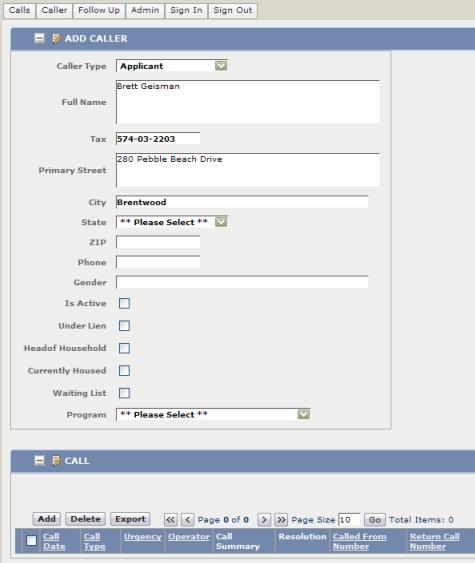
Logging an inbound call.
The user logs in and immediately sees any calls that are still open and assigned to them. The
call may be assigned to them because of the action step or because it's a call they logged. From
here, the user determines if further actions are required, which is commonly the case, or if they
can close the call. If the user closes a call, it is filtered from the screen and removed from view,
though it is still visible in other reports.
Another kind of interaction occurs when answering the phone and talking with a specific caller.
In this case, the operator looks up the person and adds an additional call to that client's history.
This way, anyone answering the call can see all the previous dialogue with the client. The operator
can reopen closed calls if the new call reactivates an issue that requires further action steps.
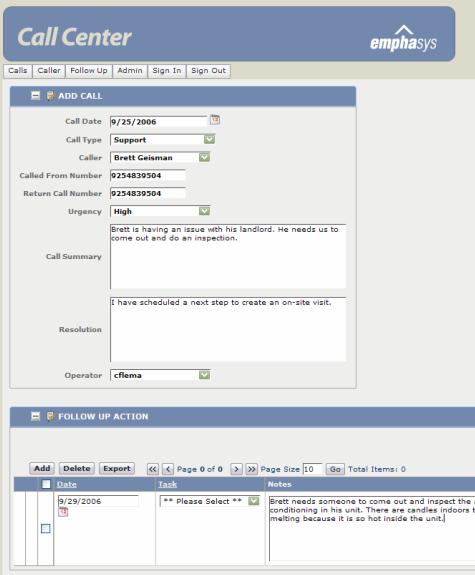
Creating action steps.
The last interaction is administrative where the administrator can configure a variety of data, from
meta-data and domain dropdown values to operator management.
|
Application size and scope |
|
Two Microsoft SQL Server databases comprise over ten tables and views, the largest
being the Caller table which currently holds 108,000 records. The application has
over 40 web pages. There are between 50 and 75 users, handling 10,000 to 15,000 transactions
each month at the Cincinnati Metropolitan Housing Authority.
|
The project |
|
The project took two developers a total of nine days to complete. Only three days
were spent on the Iron Speed portion of the project. The remaining six days were used
to meet end user requirements.
|
Code extensions and customizations |
|
We spent one day extending the application with 10 to 20 lines of custom code that add web
service capabilities to the caller and call creation routines. This customization allows
an operator to search for an incoming caller's name and verify whether they are currently
in a separate external system. If their name is found in the outside source database, another
application program pulls data into the internal database so they can proceed without re-entering
the information.
|
Page layout customizations |
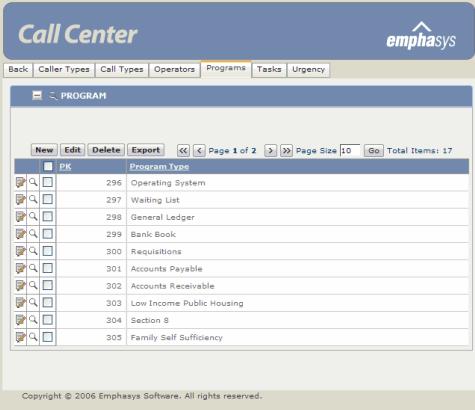
Managing administrative data.
We applied a few small changes to the page layout. In order to accommodate the excessive
amount of data this application manages, we modified the record control layout to display
two columns of fields instead of one.
We also customized one of the design themes included with Iron Speed Designer to reflect our
look and feel.
|
Iron Speed Designer impact |
We saved three man-months of development time using Iron Speed Designer and approximately
$8,000 to $10,000. This project could have easily taken four months if implemented by hand.
While it would have been possible to create this application by hand, it would have been an
incredibly slow process.
Prior to incorporating Iron Speed Designer into our development suite, our small group of
developers historically produced three applications every three months. In the last three
month period using Iron Speed Designer, we created 16 different applications!
|
Next steps |
We plan to tie the Emphasys Call Center application into two other Iron Speed
Designer applications that we're deploying. This allows an incoming
caller to the Housing Authority to check on their wait list status while modifying
their housing application simultaneously.
Many other Housing Authorities plan to purchase and implement our Emphasys Call
Center product.

|
View the application |
|
Visit www.cintimha.com.
|
About the developers |
Chris Lema is the Vice President of Software Engineering for Emphasys Software
in Petoskey, MI. He has been developing software products for over 15 years.
Chris holds a degree from the University of California, Berkeley.
Brian Reath is an intern at Emphasys Software and is currently completing his
education at Michigan Tech University. This was his first commercial application ever.
Visit www.emphasysworld.com
|
|
|
|
|
|
|